
100% Free & Open Source · Engineered for 100MB+ & Multi-Gigabyte Files

Instant-Open Gigabyte Files.
Zero Lag. Zero Crash.

Engineered with Rust and Tauri 2.0. Power Editor pairs a memory-mapped B-tree Rope buffer with virtual viewport rendering to stream massive logs and dumps in milliseconds. Full UltraEdit Wordfile syntax compatibility out of the box.

Auto-detected: Windows 10/11 MIT License · Completely Free for Personal & Commercial Use No Telemetry · Zero Cloud Sync · 100% Offline
< 1.4s
100MB Regex Full Search
power-editor — production-access.log (2.41 GB)
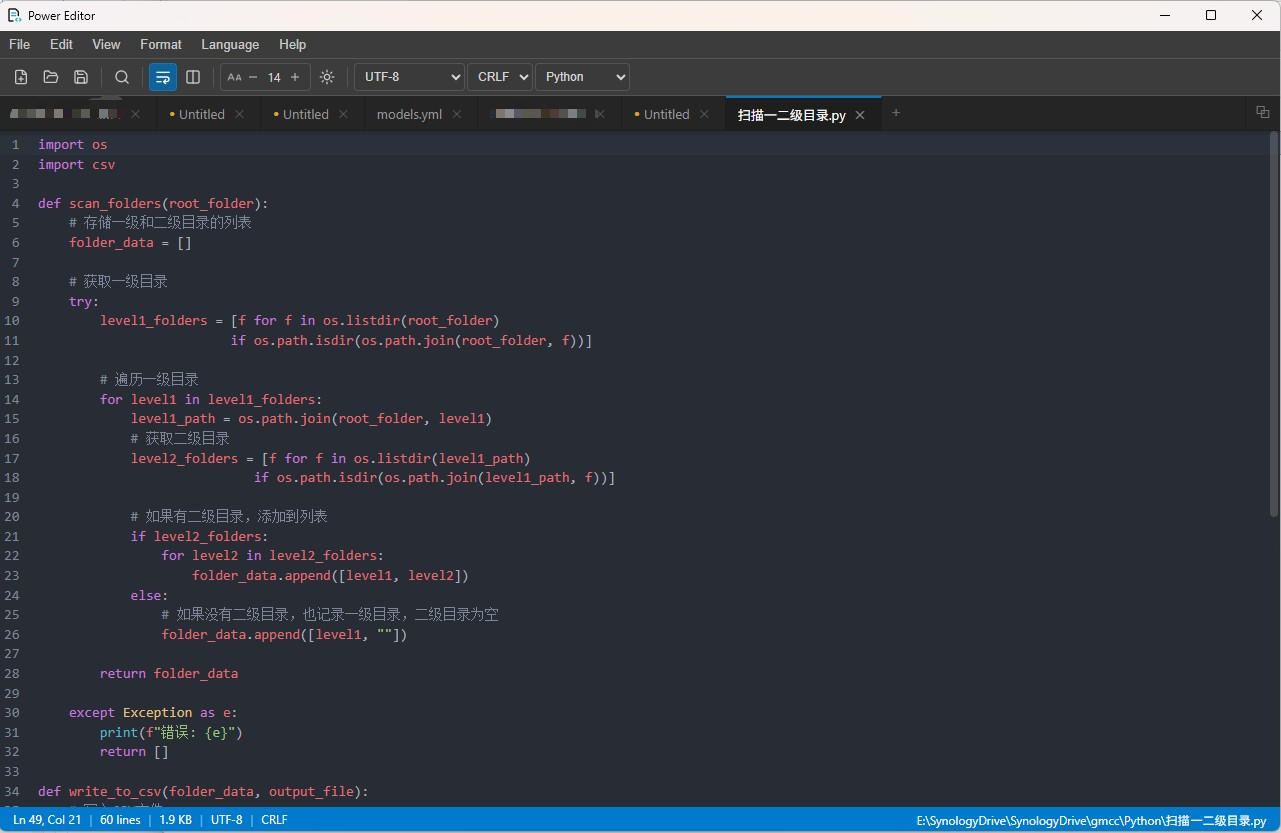
Power Editor Application UI Screenshot showing large file editing, syntax highlighting, and dark mode
< 95 MB RAM
Memory Footprint (B-tree Rope)

Engineered to Slay Memory Monsters

Traditional editors buffer whole files in memory or choke on single-threaded JavaScript engines. Power Editor leverages Rust memmap2 and SIMD acceleration for instant responsiveness.

Benchmark Dataset: Select File Size to Compare
Editor Power Editor (Open Source) VS Code Notepad++ UltraEdit (Commercial)
File Open Latency 0.28s Fastest 4.8s (laggy) 2.1s 1.2s
RAM Consumption 86 MB Minimal 680 MB 340 MB 180 MB
Full-Text Regex Search 1.4s SIMD Speed 12.5s 6.8s 3.1s
UltraEdit Wordfile (.uew) Native Import Not Supported Not Supported Native
Price / License 100% Free (MIT) Free (Telemetry) Free (GPL) $99.95 / yr

* Benchmark tested on Intel i7-13700H, 32GB RAM, Windows 11. Results on macOS and Linux show equivalent performance ratios.

Built From the Metal Up for Extreme Performance

No bloated browser engines. No garbage collector pauses during search. Pure Rust I/O combined with lightweight modern UI.

Rust B-Tree Rope & Virtual Rendering

Powered by the ropey data structure and memory-mapped files (memmap2). Rather than reading gigabytes into continuous memory, Power Editor loads only the visible viewport with zero memory explosion.

ropey memmap2 CodeMirror 6

Hardware SIMD Regex Search Engine

Leveraging Rust's AVX2 / NEON hardware SIMD acceleration. Search across 100MB+ logs and million-line CSV files in less than 2 seconds without hanging your user interface.

SIMD Regex Zero UI Hang Find & Replace

UltraEdit Wordfile (.uew) Compatibility

The premier open-source replacement for UltraEdit. Import your custom .uew syntax highlighting definitions at runtime without converting formats or rewriting extensions.

.uew Parser Legacy Syntax Runtime Import

Smart Encoding & Lossless Reopen

Automatic encoding detection via chardetng and encoding_rs. Reopen files on-the-fly under UTF-8, GBK, Big5, Shift_JIS, or ISO-8859 directly from the status bar without file corruption.

UTF-8 / GBK / Big5 LF ↔ CRLF Auto Detect

Column Mode & Multi-Cursor Editing

Hold Alt and drag rectangular blocks for instant column-wise editing. Align fixed-width logs, format tabular data, and insert numbers across multiple lines simultaneously.

Alt+Drag Block Column Alignment CSV to Fixed-Width

Real-Time File Watcher & Hot Sync

Underpinned by Rust's notify and asynchronous tokio runtime. Automatically detects external modifications. Silently refreshes active logs or prompts before overwriting local unsaved edits.

notify tokio async Live Log Tail

Keep 100% of Your Custom Syntax Highlighting

Millions of developers and legacy systems rely on UltraEdit's .uew Wordfile syntax rules. Power Editor implements a full native parser, enabling seamless migration without writing new editor extensions.

  • 1
    Built-in Wordfiles Folder: Drop any .uew file directly into the wordfiles/ directory to load at startup.
  • 2
    Runtime Import: Click Language → Import Wordfile (.uew)... to load any syntax definition immediately without restarting.
  • 3
    Zero Conversion Overhead: Supports comment delimiters, escape characters, keywords groups, and syntax folding natively.
custom-syntax.uew
/L20"Custom Log Protocol" Nocase Line Comment = # String Chars = "'
/C1"Keywords"
ERROR WARN CRITICAL FATAL INFO DEBUG
/C2"Flow Control"
CONNECT DISCONNECT TIMEOUT RETRY ABORT
/C3"HTTP Status"
200 201 301 302 400 401 403 404 500 502 503

Download Power Editor

Current Stable Release: v0.1.6 · Released on Sep 23, 2026

Setup Installer (.exe) Recommended

Windows x64 Installer

Standard NSIS graphical installer with optional file association and Windows Explorer context menu integration.

Download .exe (64-bit)
Windows 10 / 11 (x64) Direct GitHub Asset
Enterprise (.msi)

Windows MSI Package

Windows Installer package ideal for system administrators and silent enterprise deployments.

Download .msi (64-bit)
Windows 10 / 11 (x64) Silent Install Ready
Looking for source tarballs, checksum hashes, or earlier releases?
Explore All GitHub Releases

Answers to Common Questions

Everything you need to know about performance, licensing, privacy, and system requirements.

Yes, 100%. Power Editor is licensed under the permissive MIT License. You can use it freely at home, in startups, or across corporate enterprise environments without subscriptions, licensing audits, or fees.
Power Editor never reads entire large files into a contiguous memory buffer. Instead, it utilizes Rust's memmap2 (OS-level memory mapping) and a B-Tree Rope structure (ropey). The user interface only renders the text lines currently visible inside the viewport. Whether your log file is 100MB or 5GB, RAM consumption typically remains under 100MB.
Power Editor includes a built-in Rust parser for UltraEdit's proprietary .uew configuration format. You can place your existing Wordfiles into the wordfiles/ application directory or import any .uew file on-the-fly via Language → Import Wordfile (.uew).... The syntax tree is generated and applied to the editor session immediately.
No. Power Editor has zero network telemetry, analytics, or background tracking. Your sensitive production logs, proprietary code, and databases remain strictly local to your machine. It operates completely offline.
Power Editor runs on Windows 10/11 (64-bit), macOS 11.0+ (Apple Silicon & Intel), and modern Linux distributions with glibc 2.31+. On Windows, it leverages the native Microsoft Edge WebView2 runtime (pre-installed on almost all Windows 10 and 11 systems).
This landing page features a dual-layer update system. When loaded in a browser, it automatically fetches the latest release assets directly from GitHub's REST API and updates all download buttons in real time. For static deployments, a single command node scripts/update-version.js <tag> updates all local URLs in seconds.